

AI Product Modernization Playbook · Article 05 of 12
A support specialist has the customer record open, a sales manager is reviewing a deal, and an analyst is investigating a change in a metric. Each already has a task, a screen and a reason to act. A useful AI copilot meets them at that moment and helps them finish the work.
That requires more than a conversational interface. The product must assemble the right context, respect the user's permissions, choose an appropriate place for the suggestion and make the result easy to verify. It also needs evidence that the assistance improves the whole task after waiting, reviewing and correcting are included.
This chapter of Infinity Technologies' AI Product Modernization Playbook explains how to build copilots into an existing workflow. It covers scoped skills, contextual UX, controlled changes, evaluation and rollout. Examples and pilot targets are illustrative; they are not reported Infinity client outcomes.
On this page
1. Choose a task with an observable outcome
Start with a specific job: prepare a follow-up from the selected meeting, check a quote before submission, explain a change in an account metric or complete a service record. Define where the task starts, where it ends and what a successful result means. “Make users more productive” is too broad to guide a release decision.
Observe both experienced and newer users. Identify repeated reading, copying, searching and checking, but also the judgement they apply. A task that appears to be writing may actually be reconciling conflicting facts. Generating fluent text will not remove that bottleneck unless the product also helps resolve the conflict.
Write the feature contract before the prompt
A compact contract names the user, task, trigger, required information, output, permitted actions, owner and fallback. It also names a primary outcome and quality guardrails. For example: help support specialists prepare an accurate reply in less active handling time, while monitoring reopen rates and factual errors over a defined follow-up window.
Measure the baseline with the existing workflow. Include review and correction effort, incomplete tasks and downstream rework. A suggestion can save a minute in the editor and create several minutes of work for the next person.
2. Match each skill to a moment in the workflow
A skill is a small, versioned capability with a clear trigger, context specification, tools, output format and UI surface. Give each skill its own evaluation set. A strong drafting skill does not establish that the same model is reliable at explaining metrics or changing records.
| Skill | Useful product surface | Control to preserve |
|---|---|---|
| Draft in context | A reply or report draft beside the source record | User edits and sends; evidence stays accessible |
| Check before submission | A warning anchored to the exact field or clause | Distinguish an advisory judgement from a hard validation rule |
| Explain a metric or score | A concise explanation with query results and source links | Numbers and attributions come from the relevant tools |
| Recommend a next action | A ranked option with supporting signals | Evaluate the ranking separately from its written explanation |
| Guide or prefill | Field suggestions and step-specific help | Show changed fields and require review before submission |
| Prepare several changes | A bounded change set with a readable diff | Approval applies to the exact changes presented |
Swipe horizontally to read the full table.
Use explicit requests first. Add step-entry or pre-submission offers when there is evidence that they help. An inline completion is designed to appear during typing; an unrelated panel opening while the user composes a sentence is an interruption.
3. Assemble context with the user's permissions
The context assembler is the connection between the product and the model. It takes references to the current screen, record, selection and workflow step, then resolves the information through authorized backend services. The backend validates those references against the authenticated session; a record identifier supplied by the browser is not proof of access.
Keep relevance, freshness and access together
Define the fields and related records needed by each skill. Prioritize the current record, relevant recent activity, approved knowledge and authoritative tool results. Attach source IDs, versions and retrieval times. Apply tenant and record permissions before data reaches retrieval results, caches or prompts.
Cache keys should distinguish tenant, user or effective access scope, record, permission version and relevant data version. Invalidate cached context when permissions or source records change. Recheck authorization when applying an action: a user who could read a record when a draft was prepared may no longer have that access at approval time.
Put a budget on context. Drop complete low-priority items and record the omissions instead of truncating a critical clause halfway through. Show useful limits in the interface: “Based on three recent activities; the contract attachment is unavailable.” If the missing source is necessary for the skill, pause that skill and offer a manual path.
Treat the record as evidence
Emails, documents and customer-entered fields may contain instructions aimed at the model. Treat their contents as untrusted task data. Restrict tools independently of the prompt, validate outputs and keep the write path behind server-side policy. An instruction found in a record must not grant permission to search another tenant or change an unrelated account.
4. Build a runtime around small, testable skills
The product sends a skill request with record references and a request ID. The runtime checks the trigger and access policy, assembles context, invokes an approved model and validates a structured result. The UI receives typed output: a draft, a citation, a warning or a prepared action, each associated with the same request and context version.
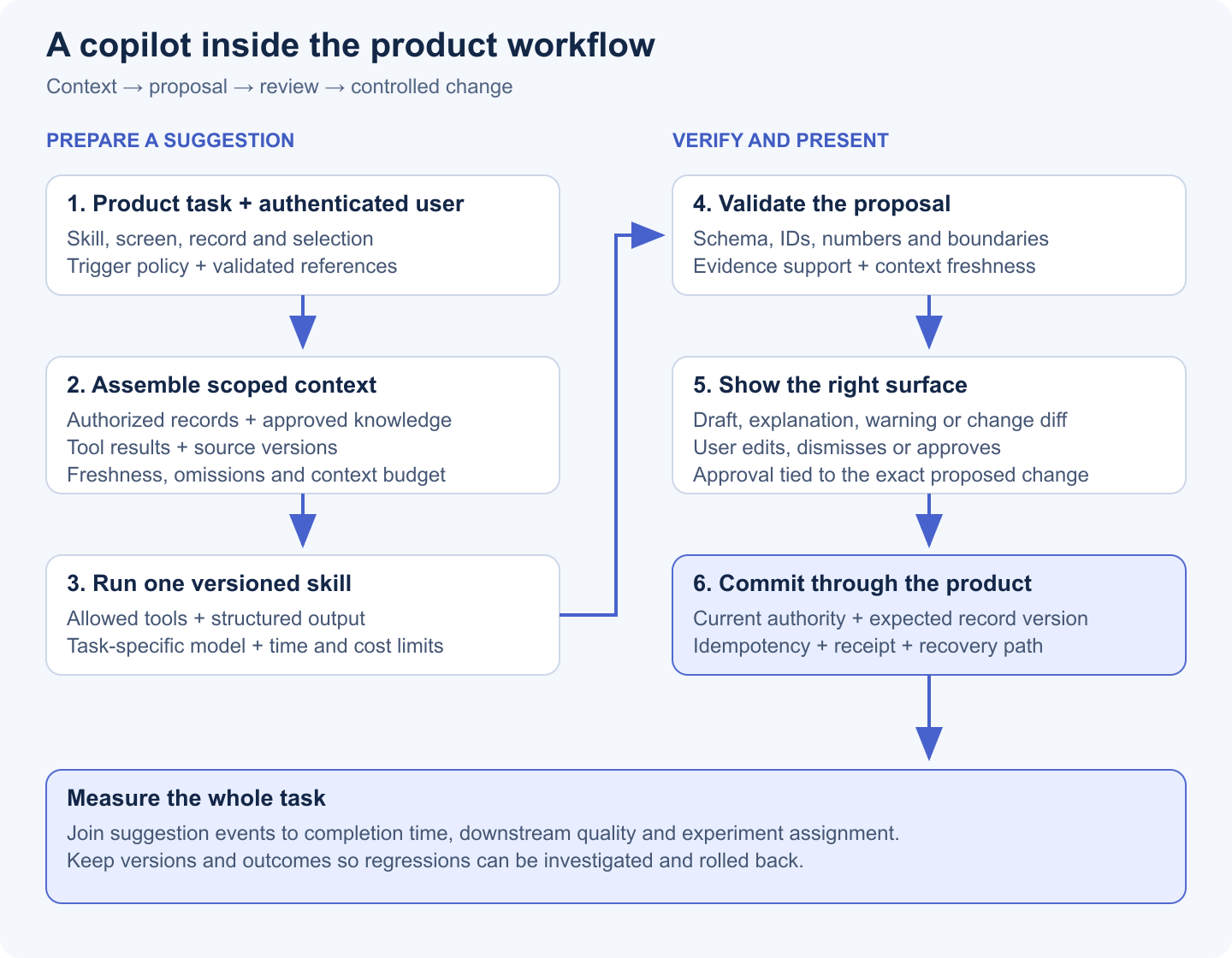
A skill registry should record the owner, version, supported task types, context sources, allowed tools, output schema, UI surface, action limits and evaluation reference. Model, prompt, retrieval and policy changes belong to a release version so a regression can be reproduced and rolled back.
Validate what code can establish
Check schema, source existence, permitted record IDs, numeric consistency and action limits deterministically. Use domain review or a calibrated evaluator for qualities such as clarity and factual support. A valid citation ID does not prove that the cited passage supports the claim, and a valid output schema does not make the proposed action correct.
Cancel or mark stale suggestions when the user changes records, modifies important fields or starts a newer request. A late response should not overwrite the text they are now editing. Tie the displayed result to the task and context snapshot that produced it.
5. Give language, calculation and ranking separate jobs
Use language models to draft, summarize, explain and prepare structured proposals. Retrieve prices, totals, dates and performance figures from authoritative services. Where arithmetic is required, calculate through tested code or a query, then provide the result and its definition to the model.
An explanation of a metric needs its period, comparison baseline, filters and units. “Revenue fell by 8%” is incomplete if one period includes refunds and the other does not. Validate those definitions before polishing the sentence. For a predictive score, describe the model's supporting factors without presenting feature attribution as proof of causation.
Recommendations need their own evidence
A propensity score estimates an outcome under its training conditions. It does not automatically identify the action that will improve that outcome. Use suitable ranking or treatment-effect methods, business constraints and experiments for next-action recommendations. The language layer can explain the selected option and prepare the next step.
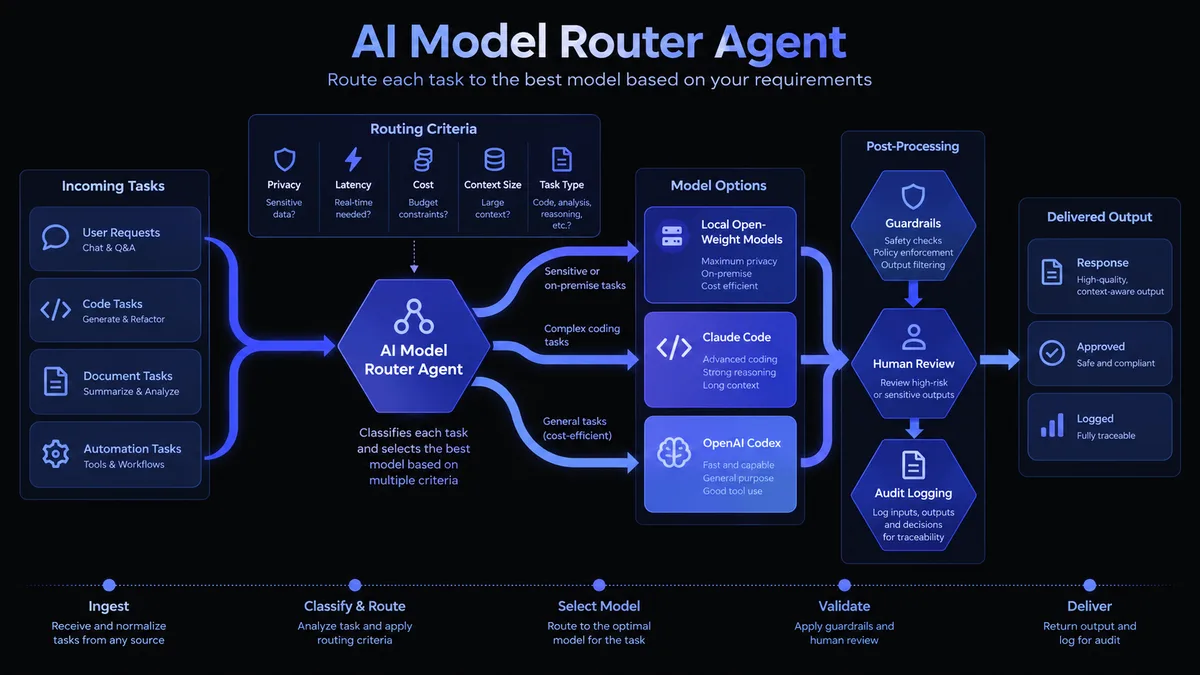
Choose model capacity by skill requirements and measured quality. A low-latency completion may need a different route from a multi-source draft. Treat routing changes as releases, and verify that a fallback model supports the same schema, data policy and task behavior.
6. Make assistance easy to inspect and dismiss
Place the help beside the work it changes. Use inline text for completion, a source-linked card for explanation, an anchored marker for a warning and a diff for several proposed changes. A command entry point can coexist with these surfaces, but users should not have to invent a prompt to discover a frequent, well-defined action.
Make verification cheaper than blind acceptance
Show context chips, links to supporting evidence and highlighted changes. Preserve the user's edits when regenerating. Offer selection-level replacement instead of replacing an entire document by default. For warnings, identify the affected value and explain what to check; repeated generic caution banners teach people to ignore them.
Respect focus, keyboard navigation and screen-reader status announcements. Do not move focus as tokens stream. Let users dismiss or disable an offer, and remember repeated dismissals for that suggestion type. Track interruptions as a cost alongside inference and latency.
Newer users may benefit from step-by-step guidance and explanations of why a change matters. Experienced users may prefer a compact diff and fewer offers. Test these choices rather than assuming seniority always predicts benefit. Include tasks completed without assistance when assessing whether users are learning the underlying process.
7. Bind approval to the exact proposed action
The Playbook separates advice, drafts and actions. At the advisory level, the user decides and acts. At the draft level, the copilot creates an artifact for review. For an approved action, it prepares a bounded change set and waits for confirmation before committing. Recurring autonomous execution is a separate design problem, covered in the next chapter.
A confirmation should identify the target, old and new values, evidence, recipients where applicable, and consequences. Associate approval with a change-set hash and source versions. If the content or relevant state changes, return an updated preview instead of treating the earlier click as unlimited authority.
Design for retries and partial failure
The commit service checks current permissions and expected record versions, then uses an idempotency key to prevent duplicate writes on retry. Store the actual outcome and receipt from each downstream system. If one of several updates fails, show which succeeded, which failed and what can be retried safely.
Undo is straightforward for a local draft and more complicated for a sent message or external transaction. Provide genuine reversal where possible; otherwise state the limit before confirmation and define a compensating action. Do not label an action reversible merely because the interface has an Undo button.
In this Playbook's design, skills affecting hiring, performance, credit or clinical decisions stay focused on assembling evidence for a responsible person. That is a product boundary, not a claim that a confirmation dialog alone satisfies every obligation in those domains.
8. Read productivity studies at the task level
Published research supports the potential of copilots and the need to measure their limits. Each result belongs to a particular task, population and tool generation. It is evidence for a hypothesis to test in your product, not a forecast of your return.
Support work: benefits differ by experience
The updated Generative AI at Work paper studies 5,172 support agents and reports an average 15% increase in issues resolved per hour. Less experienced and lower-skilled workers improved speed and quality, while the most experienced and highest-skilled workers saw small speed gains and small quality declines. This was a staggered deployment in one setting, so the useful design lesson is to examine quality and experience groups separately.
Consulting: similar-looking tasks can have different limits
A preregistered experiment with 758 BCG consultants found that AI users completed 12.2% more tasks and worked 25.1% faster on tasks within the tested model's capabilities. For the selected task outside those capabilities, the paper reports an average correctness drop of about 19 percentage points across the AI conditions. The published study supports evaluating individual task types rather than assigning one quality score to the entire copilot.
Development: perceived speed can diverge from measured time
In METR's early-2025 trial, 16 experienced open-source developers completed 246 tasks in familiar repositories. With AI allowed, tasks took 19% longer, although developers subsequently estimated that AI had made them 20% faster. This was a snapshot of those tools and tasks, not a conclusion about all software work.
There is also a material update: in February 2026, METR reported that its later experiment was affected by participant and task selection, alongside timing difficulties with concurrent agents. The researchers considered greater acceleration plausible but described the data as weak evidence for its size. The practical lesson is to keep both tools and measurement methods under review.
9. Measure suggestions and completed work separately
Suggestion telemetry tells you whether an offer appeared, was accepted, edited, rejected, ignored or undone. It helps diagnose UX and context problems. Task telemetry tells you whether the work became faster or better. Connect the two with a task-instance ID, but keep their meanings distinct.

For each eligible task, record assignment to the experiment, task type, assistance availability, active effort, completion and downstream outcomes. Keep enough version information to distinguish releases. Define the observation window for corrections, reopenings or escalations before the experiment begins.
Keep the comparison credible
Randomize at a level that fits how people share work. Team-level assignment can reduce spillover when colleagues reuse each other's drafts, but needs enough teams and analysis that accounts for clustering. Analyze assigned groups as well as actual usage; comparing enthusiastic users with nonusers confounds the feature with user selection.
Measure both active effort and elapsed completion time. Document how idle time, background processing and overlapping tasks are handled so concurrent work is not counted repeatedly. Report completion and abandonment, not only the fastest successful cases. Predefine important experience and task groups, uncertainty estimates and the minimum quality difference you consider meaningful.
Explain the telemetry purpose to affected users, minimize collected content, restrict access and set retention periods. Prefer aggregate product evaluation over individual productivity rankings. Raw context replay requires its own access and retention controls; a context digest alone is not enough to reproduce a failed suggestion.
10. Evaluate failure cases before running a pilot
Build a replay set from representative, appropriately governed task contexts. Include missing attachments, stale prices, conflicting records, different permissions, injected instructions and tasks outside the intended scope. Use domain reviewers for consequential errors and compare automated grading against those reviewers.
| Area | What to test | Release implication |
|---|---|---|
| Context and access | Needed evidence, freshness, role and tenant isolation | Fix unauthorized exposure before any broader rollout |
| Drafts and explanations | Supported claims, correct units, useful wording and faithful attribution | Separate critical errors from stylistic preferences |
| Warnings | Precision, recall and false positives on realistic submissions | Model judgements remain advisory; hard rules are validated in code |
| Prepared actions | Changed permissions, stale approvals, duplicate retries and partial failures | Verify authority, limits and recovery before enabling writes |
| User outcomes | Time, completion, downstream quality and effort by task group | Expand only where the evidence supports benefit |
Swipe horizontally to read the full table.
An illustrative pilot might aim for a 15% reduction in average active handling time while meeting a predefined non-inferiority margin for reopen rate. Those are planning choices, not universal thresholds. Sample size depends on baseline variability, event frequency, assignment level and the effect you need to detect. A small test with zero observed failures does not establish zero risk.
Offline success earns an online test. It cannot establish the effect of interruptions, review effort or changed user behavior. Keep a suitable comparison group after launch where feasible, and reassess when the task mix, context sources or model changes.
11. Treat attention, latency and cost as constraints
Set a response budget for each surface. Illustrative design targets might put inline completion near a few hundred milliseconds and begin a panel response within roughly two seconds. Measure the complete user-visible path, including context reads and validation. Fast first-token delivery is not the same as a usable, checked suggestion.
Prefetch only authorized, relevant context, use per-source timeouts and cancel superseded requests. Suppress an inline suggestion that arrives too late. If an optional source is unavailable, expose the limitation; if a required source is missing, offer the existing workflow. Templates and saved snippets are useful fallbacks. Deterministic validation should keep working during a model outage.
Calculate value after review and rework
Track inference, context retrieval, infrastructure, evaluation, support and user review costs. Cost per accepted suggestion is a diagnostic measure. Cost per successfully completed task, together with measured quality, is closer to the product outcome.
For a stable task mix, estimate saved effort as the difference between control and treatment effort multiplied by treated task volume. Include downstream correction time. If the estimated difference is zero or negative, a “cost per saved minute” ratio is not a useful value claim. Capacity released is also not automatically cash saved; explain how the organization can use it.
Limit calls, steps, fan-out and spend per request and tenant. Expensive delegated work should be explicit. Review suppression and dismissal patterns: removing an unwanted trigger can improve both the experience and the operating cost.
12. Expand skill by skill, with a recovery path
Begin with one frequent task and a small group that owns its quality. Establish the baseline, assemble a replay set, build the context and review surfaces, and instrument task outcomes before the pilot. Train users on the skill's boundaries as well as its useful cases.
Run the pilot with a defined comparison and stopping criteria. Review speed, quality and adoption together. If one task type shows harm, disable or narrow that skill even when the aggregate result looks positive. If warnings are dismissed, inspect relevance and false positives before adding more prominent banners.
Release changes behind per-skill controls. Store enough evidence to reproduce failures and maintain a rollback to the previous version or the normal manual workflow. A model upgrade is a new intervention for every affected skill, not an invisible maintenance change.
Add write capabilities only after read and draft behavior is understood. Keep change sets small enough to review, test failure recovery and confirm that approvals remain meaningful in practice. When a recurring delegated task becomes a candidate for automation, redesign its operating boundaries and monitoring rather than simply removing the confirmation step.
13. Turn the Playbook into a product decision
A useful starting brief contains five artifacts: a task inventory with baselines; a skill contract with context, surfaces and permissions; a representative replay set; an experiment plan with time and quality outcomes; and an operating model covering ownership, fallback and cost.
For a sales follow-up, that could mean using the selected meeting and current deal record to prepare a draft, sourcing any price from the quote service, flagging conflicting commitments and leaving the user to review and send. Measure the complete follow-up task and later corrections. Expand to record updates only when the approved-change path is ready.
This connects directly to the earlier chapters on permission-aware knowledge and RAG and controlled content generation. The next chapter covers agentic automation: durable execution when a workflow is ready to operate beyond an individual suggestion.
Bring Infinity Technologies one high-value workflow, the systems behind it and the outcome that matters. The engineering conversation can then focus on a concrete copilot: what it sees, what it proposes, what the user controls and how the product will demonstrate value.
Sources and further reading
Based on chapter 05, “Co-pilots: AI inside the user's workflow,” of the AI Product Modernization Playbook. Primary research checked for this article on 14 October 2026. Research results describe their study settings; the architecture and rollout guidance are engineering recommendations.
- Brynjolfsson, Li and Raymond, Generative AI at Work, updated working paper. The updated sample and productivity estimate are used here rather than the earlier 5,179-agent, 14% figures.
- Dell'Acqua and colleagues, Navigating the Jagged Technological Frontier, Organization Science, 2026 publication of the consulting experiment. The outside-frontier difference is described in percentage points using the reported group results.
- METR, early-2025 developer productivity trial, July 2025.
- METR, We are Changing our Developer Productivity Experiment Design, February 2026 update on later data and selection effects.