The table of content
Introduction
Purpose, rationale and users
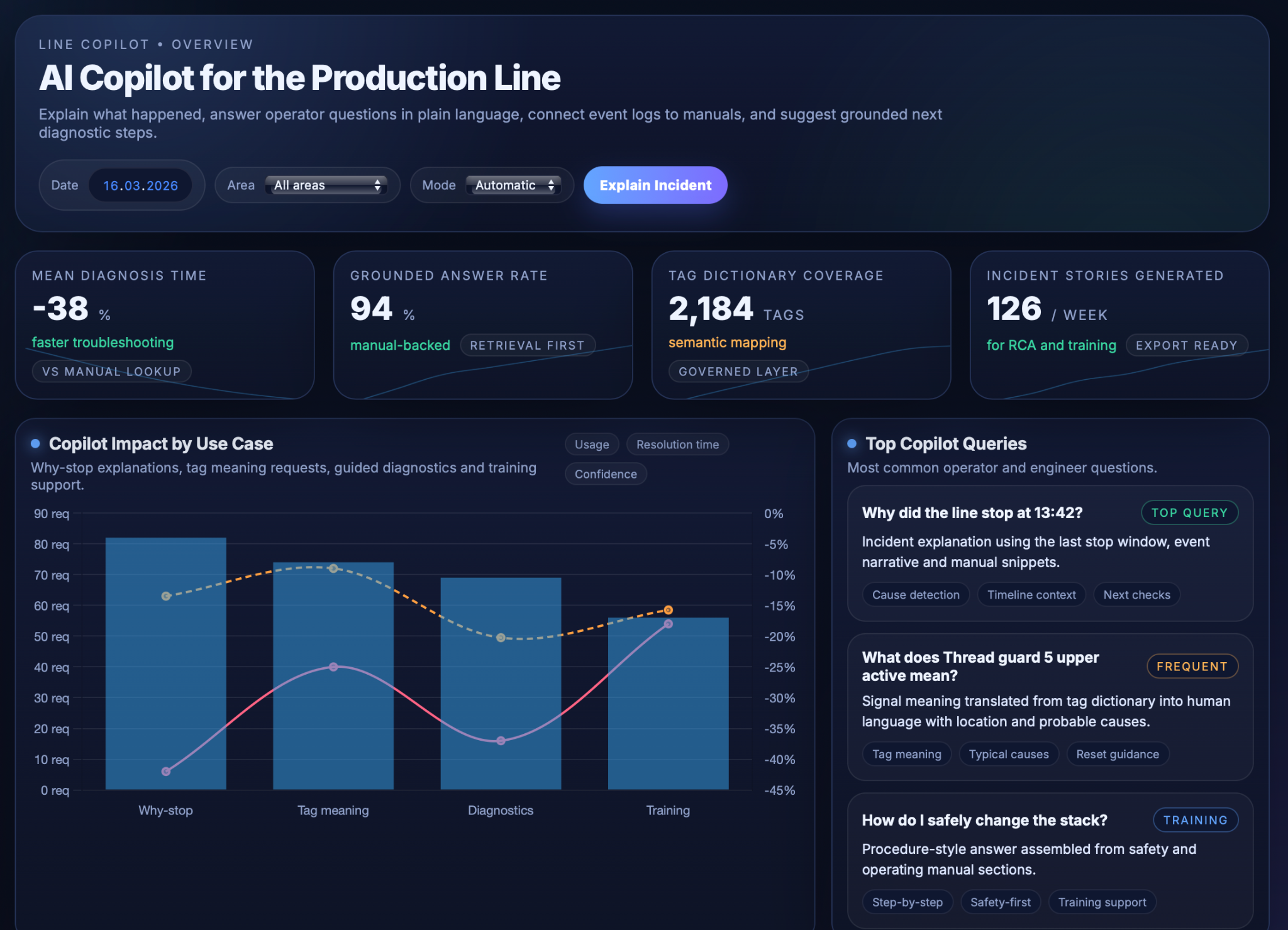
The “Explainable Line” Copilot use case focuses on making a complex production line easier to understand, troubleshoot and learn from by adding an AI assistant on top of existing PLC logs and manuals. Instead of leaving operators and engineers to interpret cryptic tag names and dense documentation, the copilot turns raw events into plain‑language explanations of what happened, why the line stopped, and what to check next. Its core purpose is to act as an always‑available expert that explains line behaviour, not to control the line itself.
Explainability matters because modern lines generate thousands of status bits, alarms and interlocks across multiple machines, while incident investigations and training still depend heavily on a few experts who “speak PLC.” When stops occur, teams often spend valuable time reconstructing event sequences, searching manuals and debating probable causes. By translating low‑level PLC tags into human concepts and combining them with indexed manuals, the copilot closes this gap: operators can ask questions like “Why did we stop at 13:42?” or “What does Thread guard 5 upper active mean?” and receive answers grounded in real logs and OEM procedures. This reduces troubleshooting time, improves knowledge transfer and builds trust in automation by making the line’s logic transparent.
The key objectives are to (1) capture and semantically enrich event logs so that they can be turned into chronological “incident stories,” (2) provide accurate question‑answering and suggested next diagnostic steps based on those stories and the manuals, and (3) enforce guardrails so that all answers remain factual, manual‑based and within defined safety limits. Primary users are front‑line operators who need quick, actionable explanations; maintenance and process engineers who require richer timelines and exportable summaries for root‑cause analysis; and trainers or supervisors who use the copilot’s explanations and incident stories as material for onboarding and continuous learning.
Inputs and Semantic Layer
Event log, manuals and semantic dictionary
The “Explainable Line” copilot builds on a structured input layer that links raw PLC activity to human‑readable concepts. At its core is a time‑stamped event log that consolidates relevant signals from sensors, drives, interlocks, alarms and mode changes along the production line, enriched with context such as active product or order, recipe, shift and current operating mode. Each change in a critical tag becomes an event, so the system can later reconstruct what happened before, during and after a stop as a coherent incident timeline rather than a flat list of bits.
Alongside this log, the copilot indexes machine documentation into a form that is easy to retrieve. Manuals for the key machines and subsystems, together with safety and maintenance documents, are converted into structured text that preserves headings, sections and tables such as alarm lists or step‑by‑step procedures. These documents are annotated with metadata like machine and subsystem, alarm codes and procedure type, allowing the system to quickly pull the most relevant pages when a particular tag, alarm or component is in focus.
A governed semantic tag dictionary then bridges PLC language and human language. For each tag it stores the raw PLC name, a human‑readable label, description, units and equipment location, plus relationships to alarms, components and procedures. Tags are classified into types (status, command, alarm, protection, quality/health), so the copilot can talk about “thread guard 5 upper in the CVX upper guarding zone” instead of a cryptic bit name. This dictionary is used both when building event narratives and when post‑processing model outputs, ensuring that explanations use consistent, governed terminology that matches how engineers and operators refer to the equipment.
Technical Realisation
Semantic retrieval, explanations and guardrails
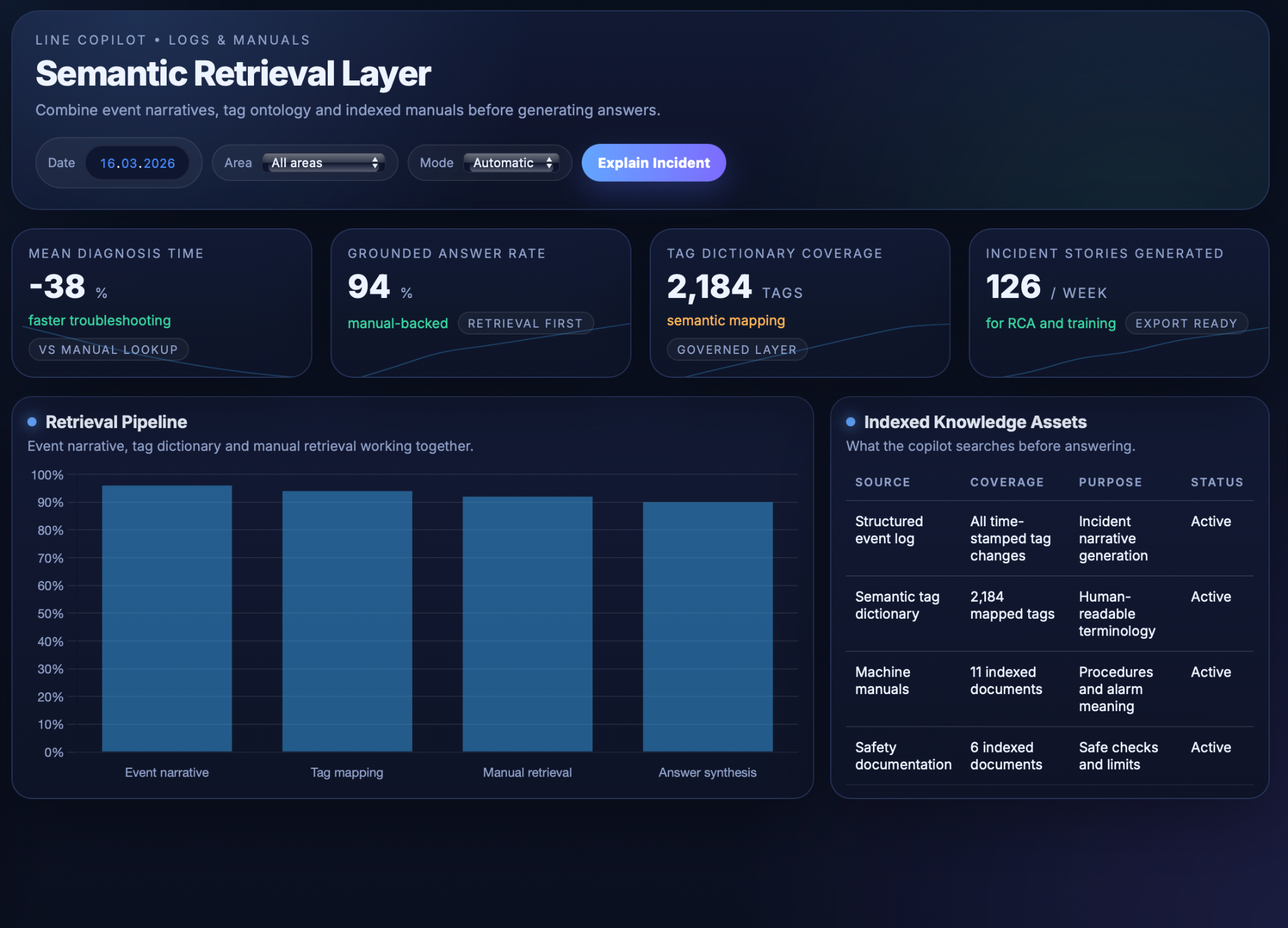
The “Explainable Line” copilot combines a retrieval‑augmented generation (RAG) layer with carefully constrained LLM behaviour so that every answer is grounded in real events and manuals rather than generic model knowledge. At a high level, the system first constructs a semantic view of what happened from logs and documentation, then asks the LLM to summarise and explain that view using structured templates and strict safety rules.
The semantic and retrieval layer normalises raw logs and prepares the right context for each question. Event messages and tag changes are converted into concise phrases and grouped into chronological “incident stories” for a selected time window, so the copilot can see what happened before, during and after a stop instead of isolated bits. Manuals and safety documents are segmented along their structure and stored in a vector index with metadata such as machine, subsystem and alarm code, allowing relevant sections to be fetched given a tag, alarm or user question. The governed tag dictionary sits on top of this, mapping PLC names to human labels, typical causes and linked procedures, and is used both as a retrieval key and as a vocabulary reference when constructing prompts and interpreting answers.
On top of this retrieval layer, the LLM performs question answering and incident explanations. For “why‑stop” questions, the copilot locates the relevant time window in the event log, identifies the primary stop cause and surrounding context from the incident story, retrieves matching manual sections and tag‑dictionary entries, and then prompts the LLM with: (a) the event narrative, (b) the selected manual snippets and tag metadata, and (c) instructions to respond concisely in a fixed structure. The generated answer explains the cause in plain language, adds contextual details such as preceding minor stops or operator actions, and summarises manual‑based meaning and recommended checks. For concept or “what does this tag mean?” questions, the same mechanism focuses on the tag‑dictionary entry and related manual content to describe function, location, typical causes and step‑by‑step reset or inspection procedures.
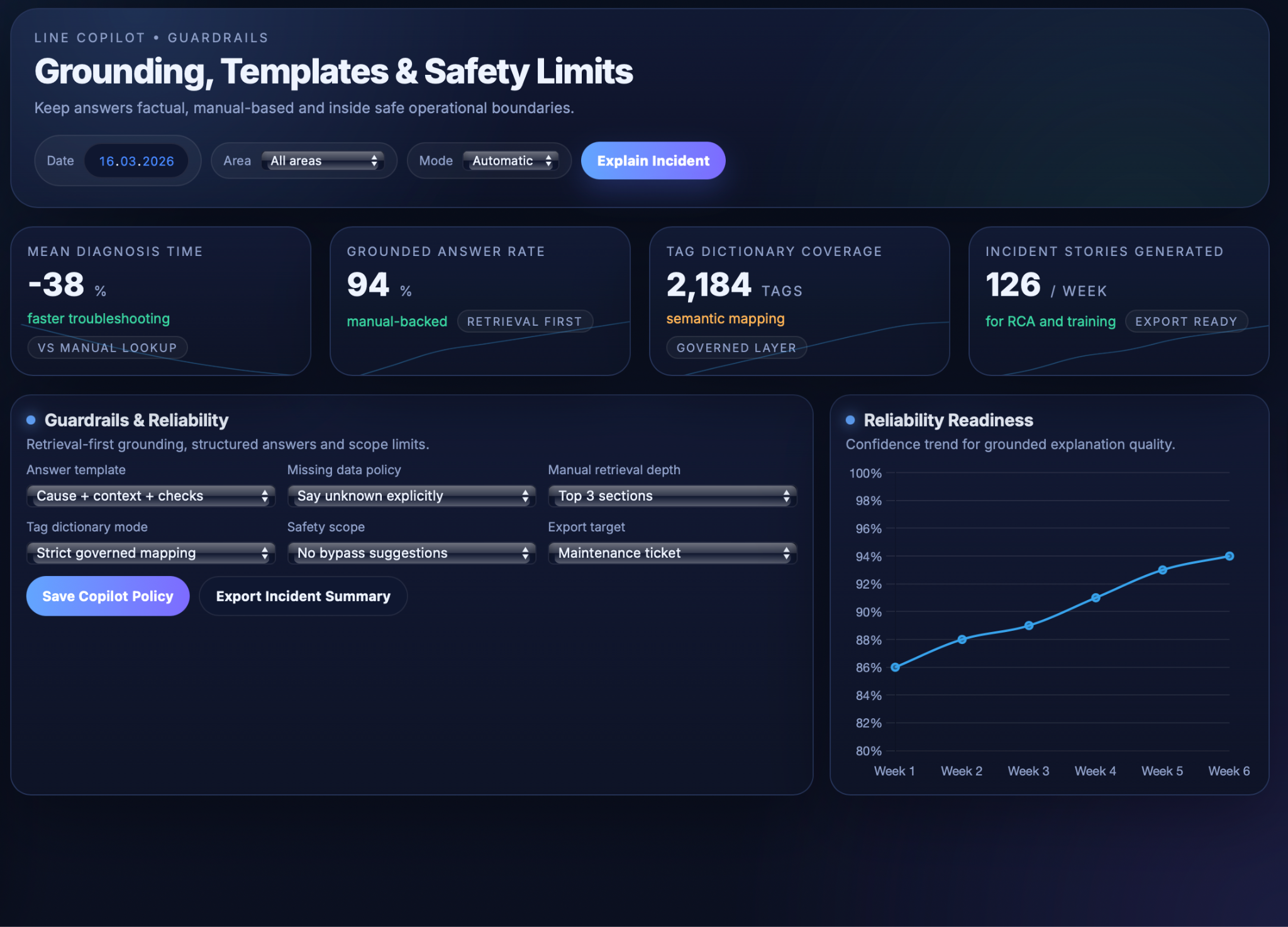
Guardrails and reliability constraints ensure that the copilot behaves safely in a production environment, reflecting best‑practice guidance for industrial RAG systems and LLM guardrails. The assistant is configured to be retrieval‑first: if relevant log or manual content is not found, it must say that information is missing instead of guessing. Answers follow structured templates (for example, cause → context → meaning → recommended checks → manual reference), and output is restricted to explanation and guidance; the copilot never suggests bypassing interlocks, modifying safety logic or taking actions outside documented procedures. Additional guardrails validate inputs and outputs, enforce use of governed terminology from the tag dictionary, and can route ambiguous or high‑risk cases to human review, keeping final responsibility with trained personnel and ensuring that explanations remain factual, traceable and within defined operational limits.
User Interface and Workflows
Operator chat, incident timelines and training
The “Explainable Line” copilot is exposed through UIs tailored to how operators, engineers and trainers actually work, so that explanations and next steps fit naturally into existing workflows rather than adding another detached tool.
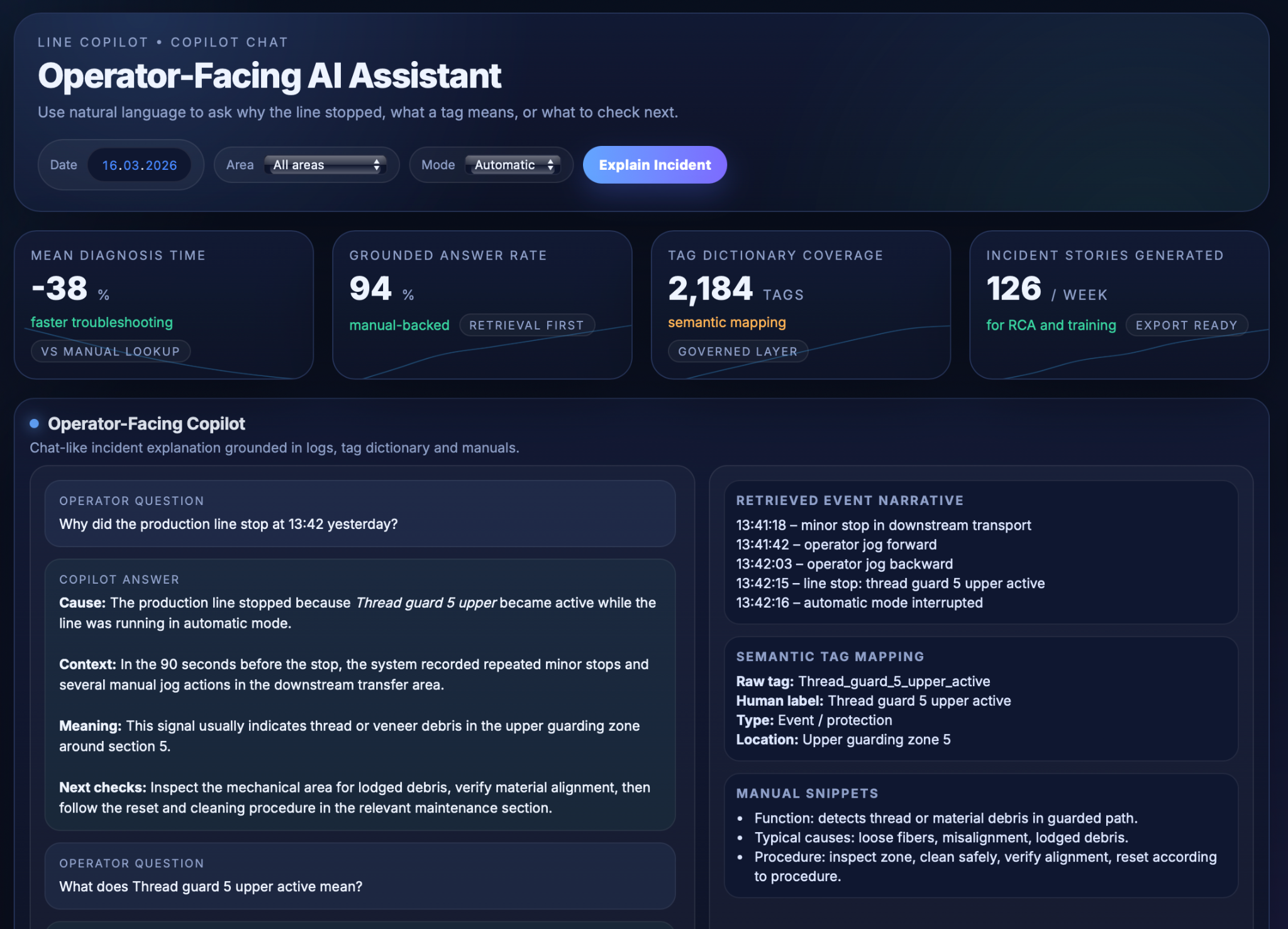
For operators, the assistant appears as a simple chat‑style panel on the HMI, tablet or workstation. They can select a recent incident (for example, “last stop”) or ask free‑form questions such as “Why did we stop at 13:42?” or “What does Thread guard 5 upper active mean?” The copilot responds with short, actionable explanations following the standard structure (cause, context, meaning, recommended checks) and offers links to the relevant manual sections for deeper detail. This reduces the need to scroll through alarm histories or search PDFs during time‑critical troubleshooting.
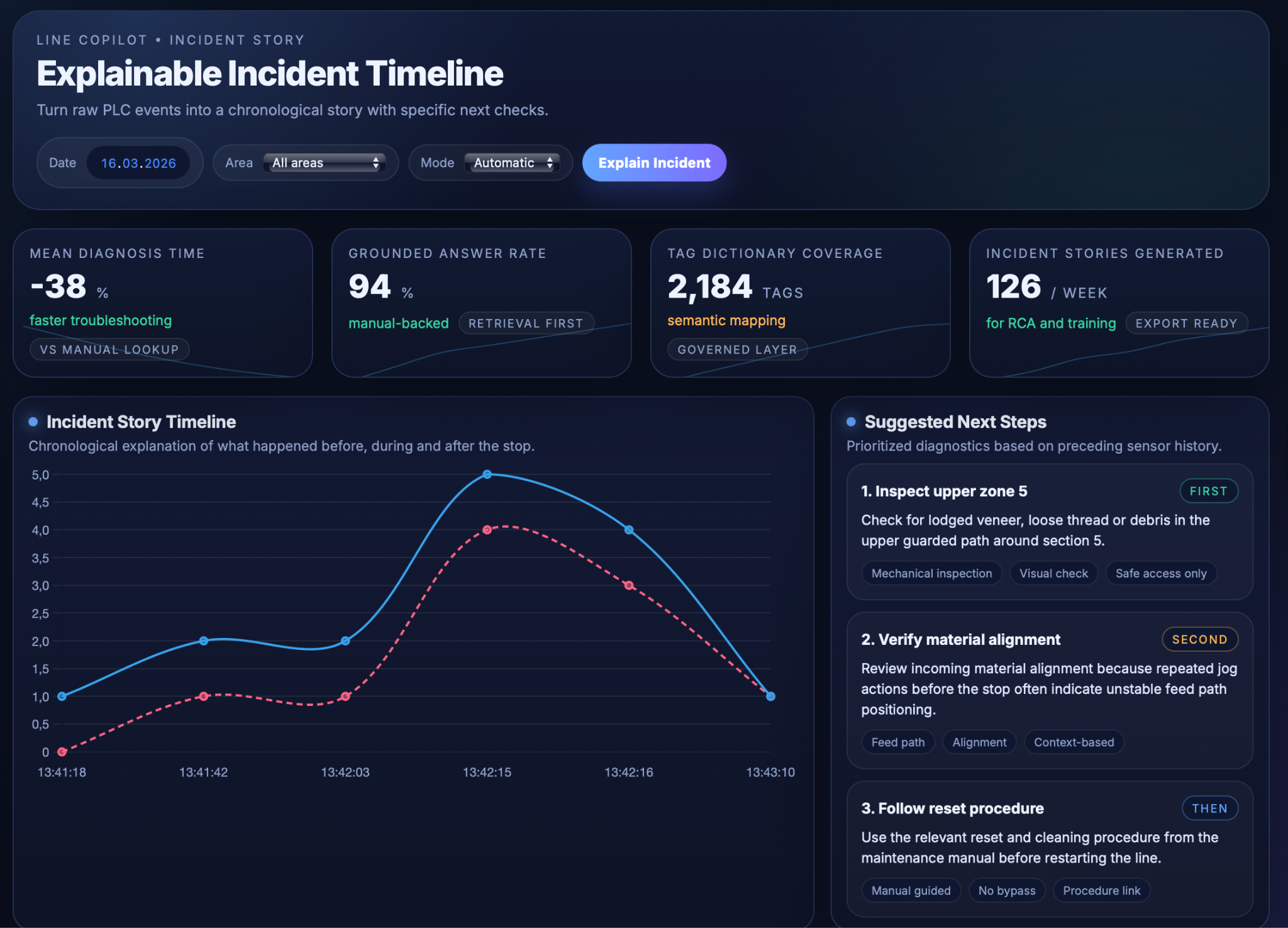
Engineers and maintenance staff access a richer incident‑timeline view that shows the reconstructed event story around a stop: key tag changes, alarms, mode switches and operator actions plotted over time. Next to this timeline, the copilot lists suggested diagnostic steps in priority order, together with references to the supporting log events and manual procedures. From this view, teams can export AI‑generated incident summaries directly into maintenance tickets, RCA documents or shift reports, which improves documentation quality without adding manual reporting effort.
The same interface also supports training and “how‑to” workflows. New operators can ask questions such as “How do I safely change the stack?” or “What is the correct restart procedure after Thread guard 5 upper?” and receive step‑by‑step guidance assembled from manuals and safety documents, optionally contextualised by the current machine state. Supervisors can use incident timelines and copilot explanations as material for toolbox talks and refresher sessions, walking through real events with clear narratives instead of raw logs. A configuration view exposes guardrail and grounding settings (answer templates, missing‑data policy, safety scope), giving engineering and safety teams governance over how the copilot responds and which procedures it is allowed to reference.
Business Value
Faster troubleshooting and less downtime
By turning scattered logs and manuals into instant, contextual answers, the copilot shortens the time it takes to understand why a stop occurred and what to check next. Industrial RAG assistants built on internal documentation have been shown to significantly reduce mean time to repair (MTTR) and related downtime costs by surfacing the right instructions and past fixes immediately instead of forcing technicians to re‑investigate from scratch. In this use case, operators no longer need to dig through alarm histories or PDFs under time pressure; they ask a question and receive a grounded explanation plus recommended checks, allowing them to resume production more quickly.
Better knowledge transfer and training
Complex OEM manuals and years of expert experience become accessible through natural‑language queries, which supports onboarding and continuous learning. Studies of LLM‑powered tools in factories show that such systems can improve knowledge sharing and make it easier for less experienced staff to perform tasks that previously required senior experts, reducing training time and reliance on a small group of “go‑to” people. Here, new operators can safely explore “why‑stop” explanations, tag meanings and step‑by‑step procedures in context, while trainers and supervisors can reuse incident stories and copilot answers as structured material for toolbox talks and refresher sessions.
Greater transparency and trust in automation
Converting opaque PLC logic into clear, chronological “stories” of what happened before, during and after an incident helps demystify the line’s behaviour. AI copilots in manufacturing are recognised as a way to improve decision‑making and operator confidence by providing real‑time, explainable guidance rather than black‑box recommendations. When operators can see which tags changed, how that maps to equipment components, and which manual procedures underpin each suggested action, they are more likely to trust both the automation and the AI assistant instead of viewing them as arbitrary or unpredictable.
Stronger root‑cause analysis and continuous improvement
Because the copilot produces structured, consistently formatted incident summaries (cause, context, meaning, recommended checks, manual references), those explanations can feed directly into maintenance tickets, RCA documents and improvement boards. Industrial RAG deployments for maintenance emphasise that capturing incident context and linking it to documentation is a key enabler for systematic fixes rather than ad‑hoc troubleshooting, and that continuous feedback from technicians can further refine the assistant over time. In this use case, accumulated incident stories and query logs highlight recurring problems, knowledge gaps and documentation weaknesses, giving engineering and CI teams a richer basis for targeted changes to equipment, procedures and training.


Our success stories
.png)
.png)
.png)
.png)





















.avif)

















Tell us about your project needs






.png)
.png)